APA Format Paper: Step-by-Step Guide (With Free Template)
Your professor said “APA format” and you nodded like you knew what that meant. Now you’re staring at a blank Word document wondering where to start. Margins? Font? Title page? Running head? What even is a running head?
This guide covers the complete APA style paper format: page setup, title page, headings, body text, references, and the mistakes that cost students points every semester. It includes a free APA template Word users can download and start writing in immediately. No signup. No email gate.
New to APA? Start with the page setup section and work through each element. Already know the basics? Skip to the template download.
What Is APA Format?#
APA stands for the American Psychological Association. APA format is a set of rules for how academic papers should look: margins, fonts, spacing, headings, title pages, citations, and references. It does not tell you what to write. It tells you how to present it.
The current version is APA 7th Edition (published 2019, with 2025 supplemental updates). If your professor just says “APA format” without specifying an edition, they mean 7th edition.
APA style is required in most psychology, education, nursing, social science, business, and criminology courses. It is used worldwide, not just in the United States. Universities in the UK, Australia, Singapore, Europe, and across South America assign papers in APA format.
One thing to know before you read any further: your instructor’s specific requirements override standard APA. If your professor asks for something different from what this guide describes, follow your professor. APA is the default. Your syllabus is the override.
APA Style Paper Format: Page Setup#
These settings apply to the entire document, every page, no exceptions.
Paper size. 8.5 x 11 inches (US Letter). A4 works for digital submissions if that’s your country’s standard.
Margins. 1 inch on all four sides: top, bottom, left, right. Word’s default is 1.25 inches on the left and right, so you need to change this. Go to Layout > Margins > Normal (1 inch).
Font. APA 7 allows several options: Times New Roman 12pt, Arial 11pt, Calibri 11pt, or Georgia 11pt. Pick one and use it for the entire document, including headings, page numbers, and references. Do not mix fonts. If your university restricts you to a specific font, follow that.
Line spacing. Double-spaced. The entire document. Title page, abstract, body, references, everything. No extra space before or after paragraphs. In Word: go to Home > Line Spacing > 2.0, then check “Don’t add space between paragraphs of the same style” under Line Spacing Options.
Paragraph indent. First line of every body paragraph is indented 0.5 inches. Use the Tab key or set a first-line indent in Word (Home > Paragraph > Special > First line > 0.5 inches). Do not use the spacebar.
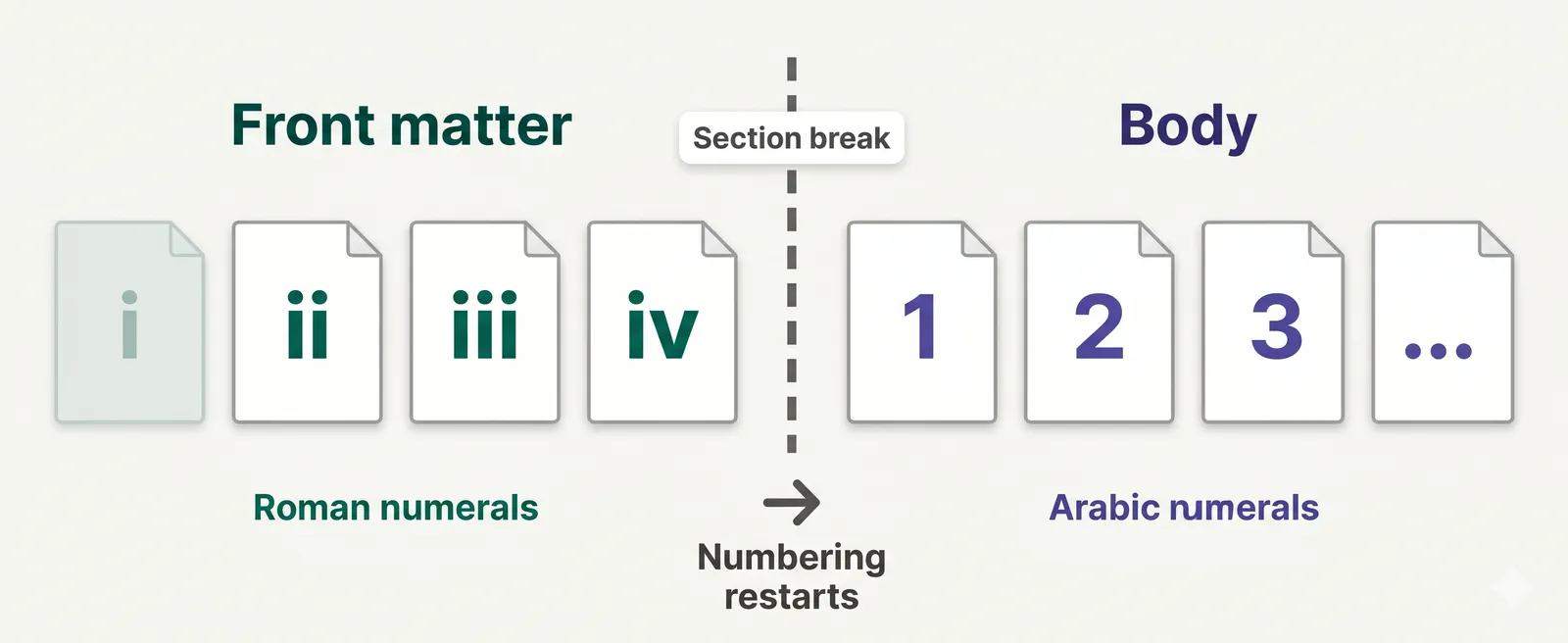
Page numbers. Top-right corner of every page. The title page is page 1. In Word: go to Insert > Page Number > Top of Page > Plain Number 3 (right-aligned).
Running head. Student papers do not need a running head in APA 7. Only professional papers (manuscripts submitted for journal publication) require one. If your professor specifically asks for one, add it.
APA Paper Title Page (Student Version)#
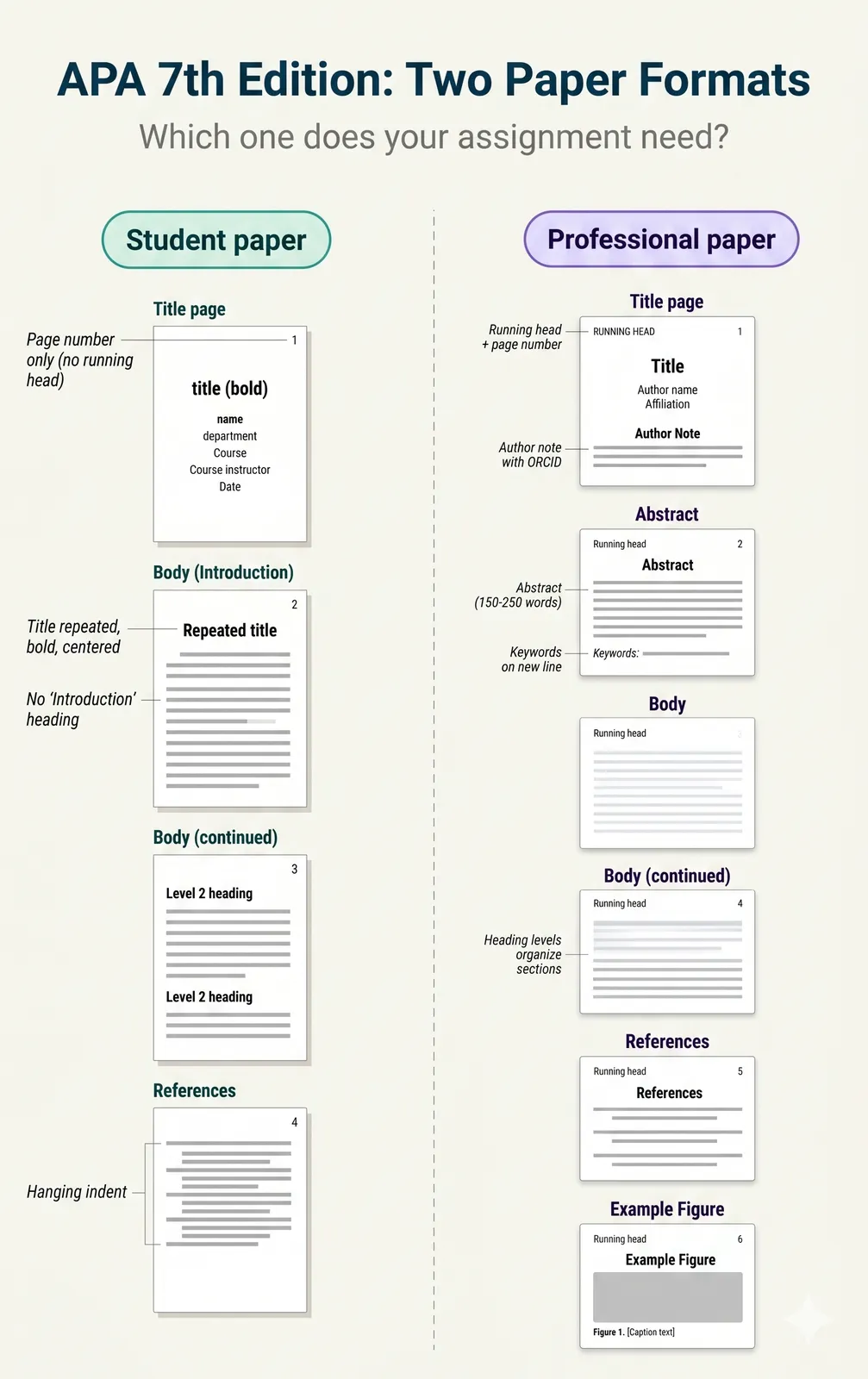
The title page is the first thing your professor sees, and it is the most common place students lose formatting points. APA 7 has two different title page formats: one for students and one for professionals. Almost everyone reading this needs the student version.
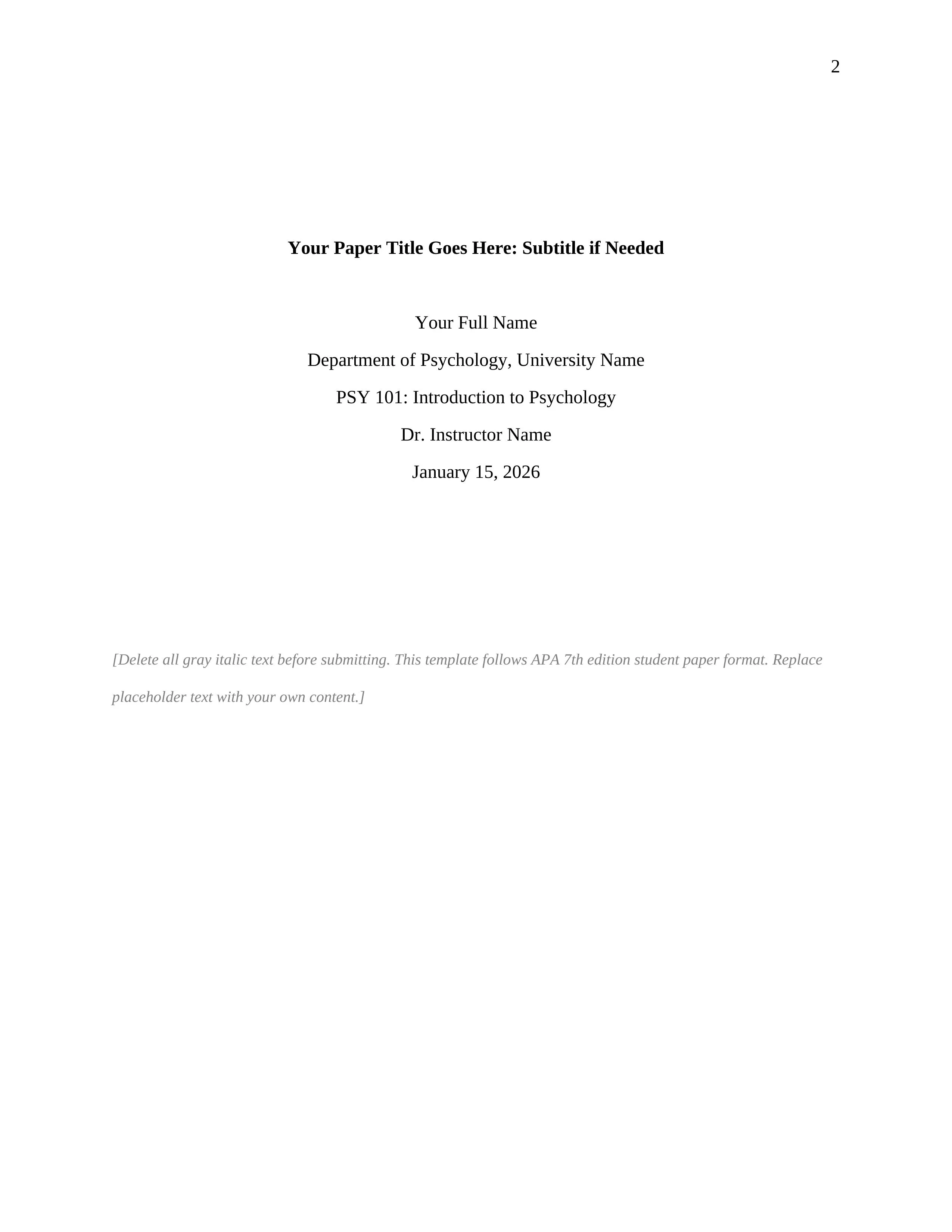
Center all of the following elements on the page, double-spaced:
Paper title. Bold, title case (capitalize major words). Start about one-third of the way down the page. Keep it concise, ideally under 12 words.
Your name. First name, middle initial (if used), last name. No titles, no degrees.
University or institution name. The full official name.
Course number and name. For example: “PSY 301: Research Methods in Psychology.”
Instructor name. Use the format your instructor prefers.
Due date. Written out in full: May 19, 2026.
The title page has no heading labeled “Title Page.” No salutation. No abstract or body text. Just these elements, centered, double-spaced.
Abstract (Usually Optional for Students)#
Most student papers do not need an abstract. APA 7 makes it optional for student work. Include one only if your instructor requires it.
If you do need an abstract: the word “Abstract” goes at the top of a new page (page 2), centered and bold. Below it, write a single paragraph of 150 to 250 words summarizing your paper’s purpose, method, results, and conclusions. This paragraph has no first-line indent. Below the abstract, you may include a keywords line: indent 0.5 inches, write “Keywords:” in italics, then list 3 to 5 keywords in lowercase, separated by commas.
Body Text and APA Heading Levels#
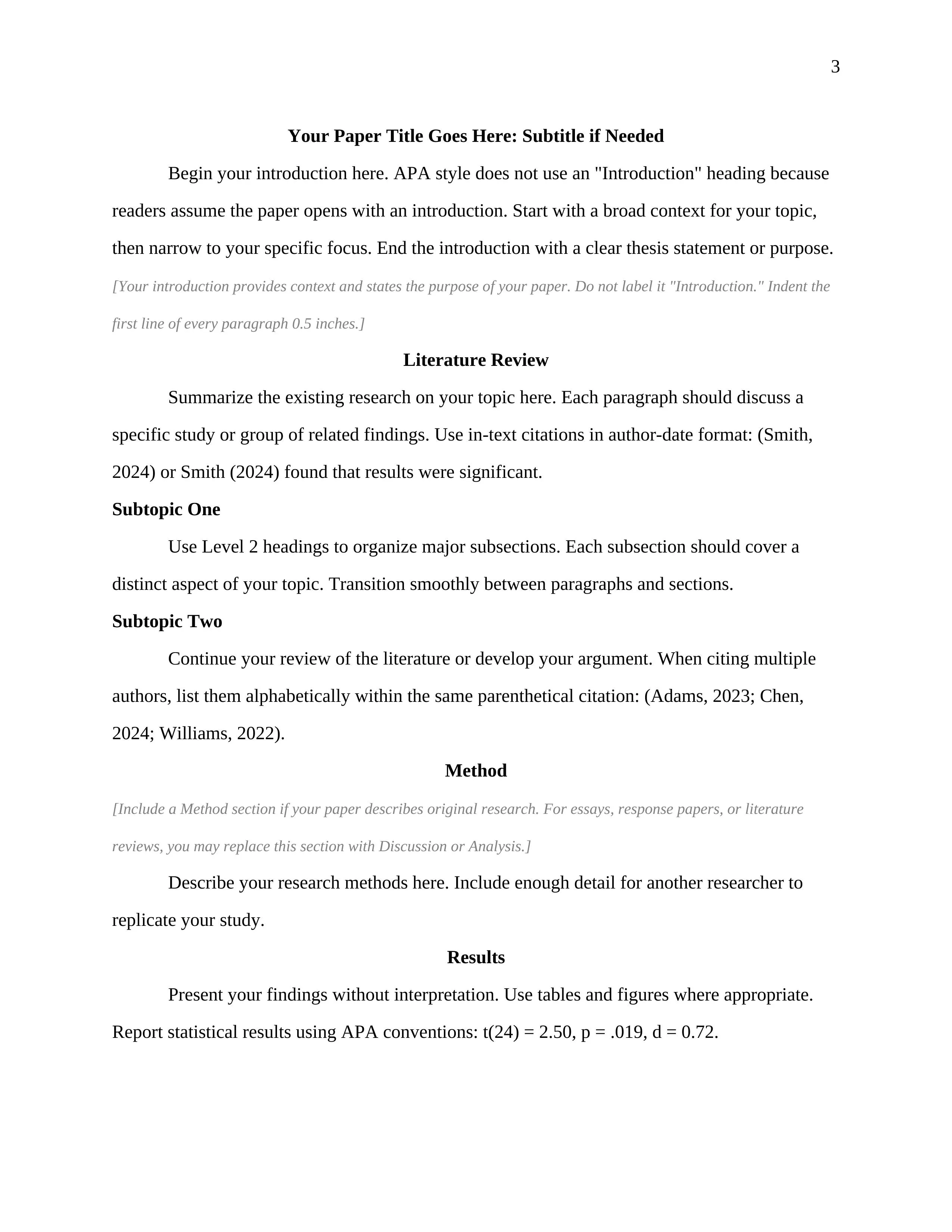
The body of your paper starts on a new page after the title page (or after the abstract, if you have one). At the top, repeat the full title of your paper, centered and bold. This serves as the heading for your introduction. Do not write the word “Introduction” as a heading. APA does not use that label.
After the title, begin your first paragraph with a 0.5-inch indent.
The Five APA Heading Levels#
APA uses five heading levels to organize content. Most student papers only need Levels 1 through 3. Use as many levels as your paper requires, but always start with Level 1.
Level 1: Centered, Bold, Title Case. The paragraph text begins on the next line with a first-line indent. Use for major sections (Method, Results, Discussion).
Level 2: Left-Aligned, Bold, Title Case. The paragraph text begins on the next line with a first-line indent. Use to subdivide a Level 1 section.
Level 3: Left-Aligned, Bold Italic, Title Case. The paragraph text begins on the next line with a first-line indent. Use to subdivide a Level 2 section.
Level 4: Indented 0.5”, Bold, Title Case, Ending With a Period. The paragraph text continues on the same line.
Level 5: Indented 0.5”, Bold Italic, Title Case, Ending With a Period. The paragraph text continues on the same line.
Levels 4 and 5 are uncommon in student papers. If Levels 1 through 3 handle everything, do not add lower levels just for the sake of it.
References Page#
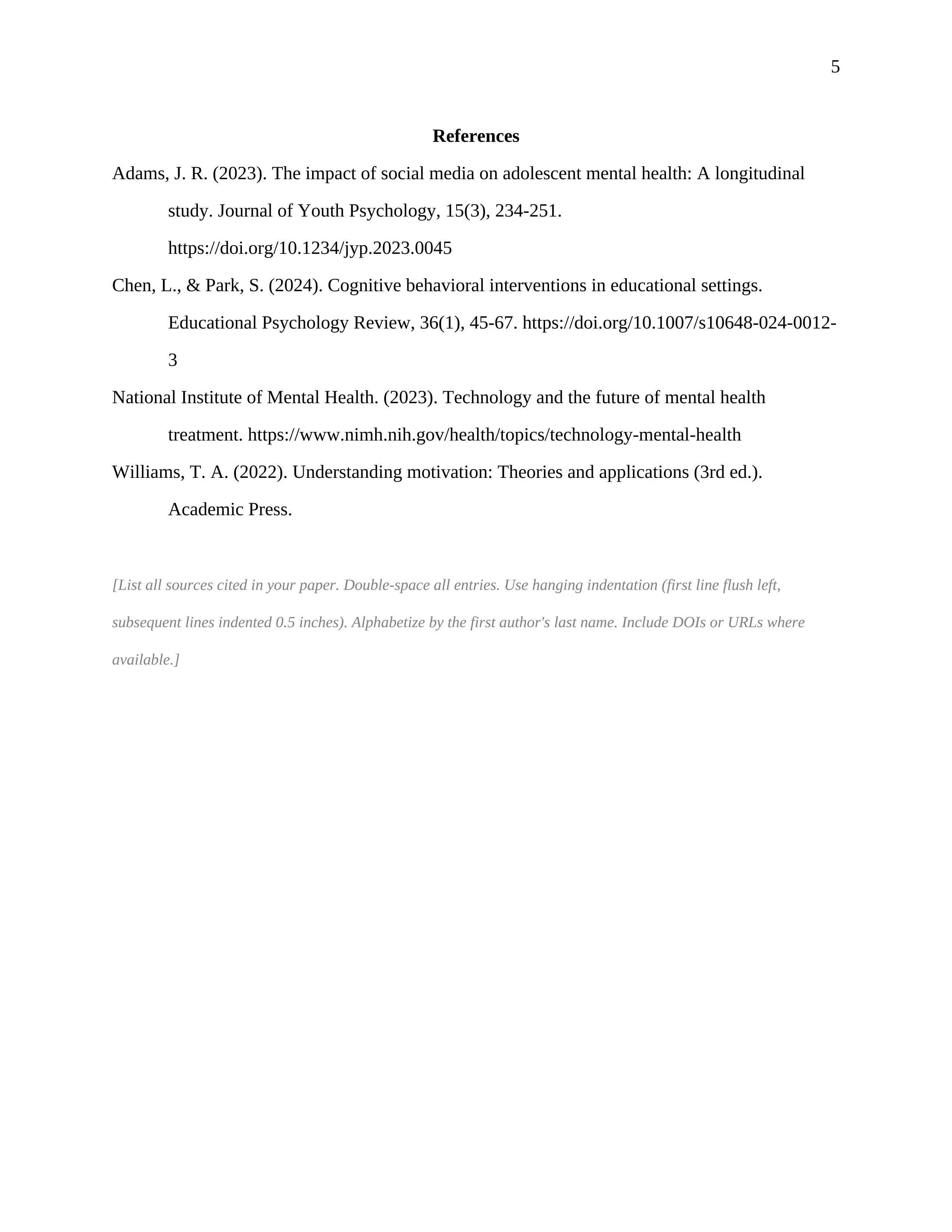
Start your references on a new page. Center the word “References” at the top, bold. Every source you cited in your paper gets a full entry here. Every entry in the references must have a corresponding in-text citation, and vice versa.
Each entry uses a hanging indent: the first line is flush left, and every subsequent line is indented 0.5 inches. In Word: select your references, go to Home > Paragraph > Special > Hanging, set to 0.5 inches.
Double-space everything, including between entries. Alphabetize entries by the first author’s last name.
Here are the three most common reference types:
Journal article: Smith, J. A., & Jones, B. C. (2024). Title of the article in sentence case. Title of the Journal in Title Case, 45(2), 123-145. https://doi.org/xxxxx
Book: Williams, R. T. (2023). Title of the book in sentence case. Publisher Name.
Webpage: National Institute of Mental Health. (2024, March 15). Topic of the page in sentence case. Website Name. https://www.example.com/page
Notice the pattern: sentence case for article and book titles, title case and italics for journal names, italics for book titles.
Common APA Format Mistakes#
Wrong margins. Word defaults to 1.25-inch left and right margins. APA requires 1 inch. Students who never change the default lose points on every paper.
Running head on a student paper. APA 7 dropped this requirement for student papers. If you are using an old template or a guide that references APA 6th edition, your title page is wrong.
Single-spaced references. The references page is double-spaced, just like the rest of the paper. This includes the space between entries.
No hanging indent on references. Every reference entry needs a hanging indent. First line flush left, subsequent lines indented 0.5 inches.
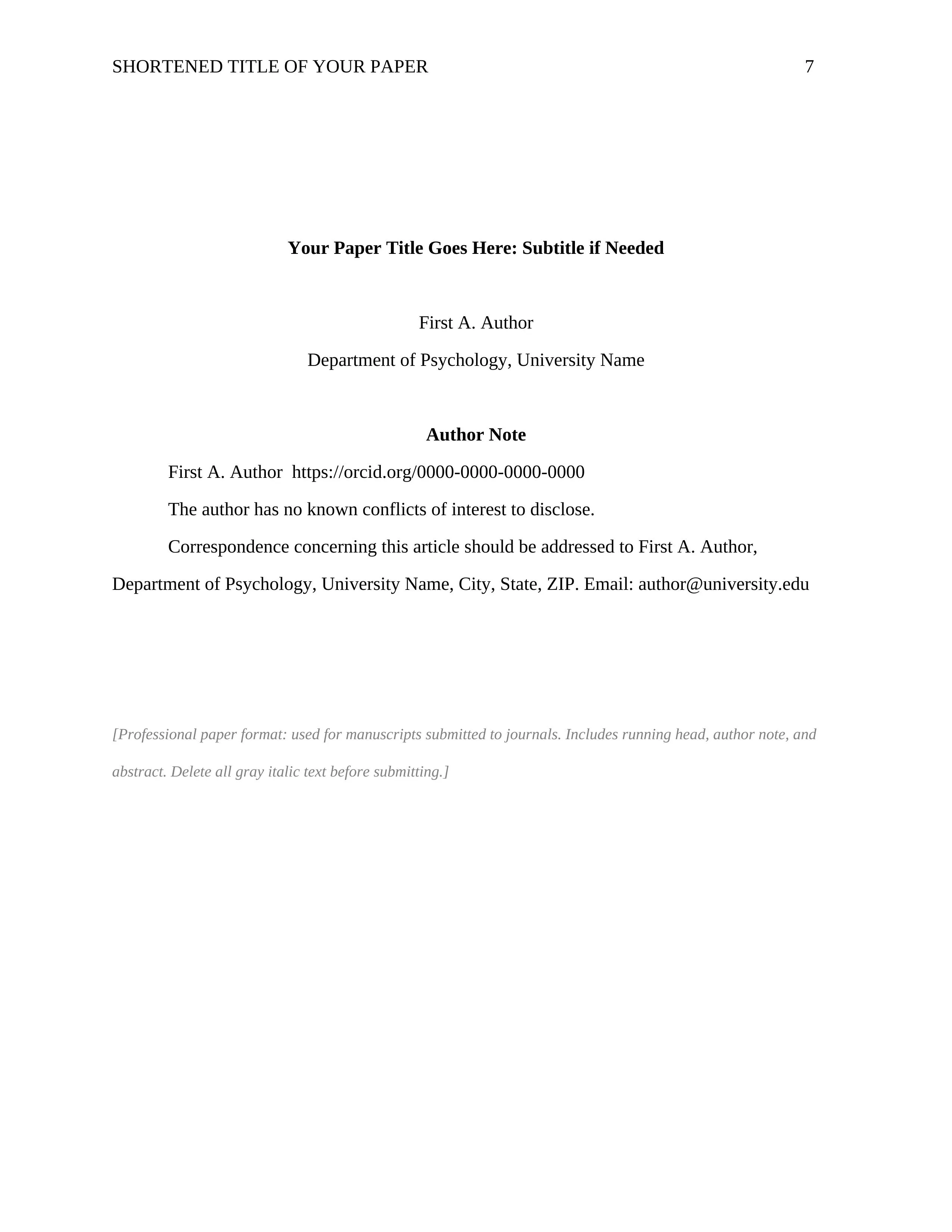
Wrong title page. Using the professional format (with author note and running head) when you need the student format (with course name and instructor). Word’s built-in APA template defaults to the professional version.
Mixing 6th and 7th edition rules. If your template includes “Running head:” on the title page or puts the author note above the institutional affiliation, you are looking at 6th edition format. APA 7 changed both.
APA Format for Different Paper Types#
The page setup, margins, font, spacing, and heading rules are identical regardless of paper type. What changes is the body structure:
Research paper. The most structured. Typically includes Method (with subsections for Participants, Materials, Procedure), Results, and Discussion.
Term paper or essay. Organizes the body around your argument. Sections might be thematic rather than following Method/Results/Discussion.
Literature review. Organizes around themes from existing research rather than reporting new data.
Report. Same APA formatting with sections appropriate to the report’s purpose: Executive Summary, Findings, Recommendations.
Thesis or dissertation. Follows APA formatting for margins, spacing, headings, and references, but your university will have additional requirements for front matter and possibly different margin settings for binding.
Manuscript for publication. Use the professional paper format (not the student format). This includes a running head, author note, and abstract.
Free APA Template Word Download#
We built a free APA 7 template Word document configured to student paper format standards. Everything is pre-set: margins, font, spacing, heading styles, title page layout, and reference page with hanging indent.
This APA format Word document includes:
Student title page with all required elements labeled. Optional abstract page (delete it if your instructor does not require one). Body text with heading levels demonstrated using Word’s built-in styles. References page with hanging indent pre-configured and sample entries (journal, book, webpage). Instruction notes covering font alternatives and how to adapt for different requirements.
The template works in Microsoft Word 2016 and later and in Google Docs. To use it in Google Docs, upload the .docx to your Drive and open with Docs. This is a student paper template; for the professional paper format (journal submission), APA provides one on their site at apastyle.apa.org.
Download the Free APA 7 Template (.docx)
No signup required. Download, replace the placeholder text, and start writing.
Frequently Asked Questions#
What is APA format for a paper?
APA format is a set of rules from the American Psychological Association that governs how academic papers are presented. It covers page layout (1-inch margins, double spacing, specific fonts), document structure (title page, optional abstract, body with headings, references), and citation style (author-date in-text citations with a full reference list). The current version is APA 7th Edition.
What font and size does APA format use?
APA 7 allows four font options: Times New Roman 12pt, Arial 11pt, Calibri 11pt, or Georgia 11pt. Use one font consistently throughout the entire document. Many universities restrict this to Times New Roman 12pt only, so check your course syllabus.
What is the difference between APA 6 and APA 7?
Student papers no longer need a running head, the title page format was simplified and split into student and professional versions, up to 20 authors can be listed in a reference (previously limited to 7), DOIs are formatted as URLs, “Retrieved from” was dropped from most web references, the singular “they” is now endorsed, and font options expanded beyond Times New Roman.
How do I set up a hanging indent for APA references in Word?
Select all your reference entries. Go to Home > Paragraph (click the small arrow in the bottom-right corner). Under “Special,” select “Hanging.” Set the indent to 0.5 inches. Click OK. Our template has this pre-configured.
How many heading levels does APA have?
Five. Level 1 is centered and bold. Level 2 is left-aligned and bold. Level 3 is left-aligned, bold, and italic. Levels 4 and 5 are indented inline headings. Most student papers only need Levels 1 through 3. Never skip a level.
I am an international student. Does APA format work the same outside the US?
Yes, the formatting rules are the same worldwide. Two things to watch: paper size (APA specifies US Letter, but A4 is generally accepted for digital submissions) and date format (APA uses Month Day, Year on the title page, even if your country uses a different convention). If your university accepts British English spelling, that is fine as long as you are consistent throughout.
What is the difference between a student paper and a professional paper in APA?
Student papers include course name, instructor, and due date on the title page. Professional papers include an author note and running head. Student papers usually do not need an abstract or running head. Professional papers require both. The body formatting (margins, spacing, font, headings, references) is identical.
Does a student paper need an abstract?
Usually not. APA 7 says abstracts are optional for student papers. Include one only if your instructor explicitly requires it. When required, it goes on its own page (page 2), with “Abstract” centered and bold at the top, followed by 150 to 250 words with no indent.