Thesis Formatting: The Complete Guide (With Free Template)
You spent months (or years) on the research. The last thing you want is for your thesis to get kicked back because the margins are wrong or the page numbering restarts in the wrong place. But that happens constantly. Graduate schools reject theses over formatting issues that have nothing to do with the quality of the work. A misplaced page number, a chapter heading in the wrong font size, or a table of contents that doesn’t match the actual page numbers can delay your graduation.
This guide covers thesis formatting from the title page to the appendices. It works whether your program requires APA, MLA, Chicago, or your university’s own style guide. You’ll get the standard thesis structure that nearly every institution expects, a format example for each major section, and a free thesis template in Word that’s already configured with correct margins, spacing, heading styles, and page numbering.
What Is Thesis Formatting?#
Thesis formatting is the process of setting up your thesis document to meet your graduate school’s requirements for layout, typography, page numbering, and organization. It covers everything from margin widths and font choices to the order of front matter pages and how chapter headings appear.
Every university publishes its own thesis formatting guide, but the core requirements are remarkably consistent. The differences tend to be small: one school wants a 1.5-inch left margin, another wants 1.25 inches. One requires the abstract on page ii, another on page iii. The underlying thesis structure is the same everywhere.
Thesis formatting applies to master’s theses and doctoral dissertations alike. Most schools use “thesis” for master’s-level work and “dissertation” for doctoral-level work, but the formatting rules are nearly identical. This guide uses “thesis” throughout, but everything here applies to dissertations as well. If you’re still deciding how to organize the content itself, start with our thesis structure guide — structure is what goes where; formatting is how it looks on the page.
Standard Thesis Structure#
A thesis has three major sections: front matter, body, and back matter. The thesis layout follows a specific order that nearly every institution requires.
Front Matter#
The front matter comes before the body of your research. These pages use lowercase Roman numerals (ii, iii, iv) for page numbers. The title page is page i but the number is not printed.
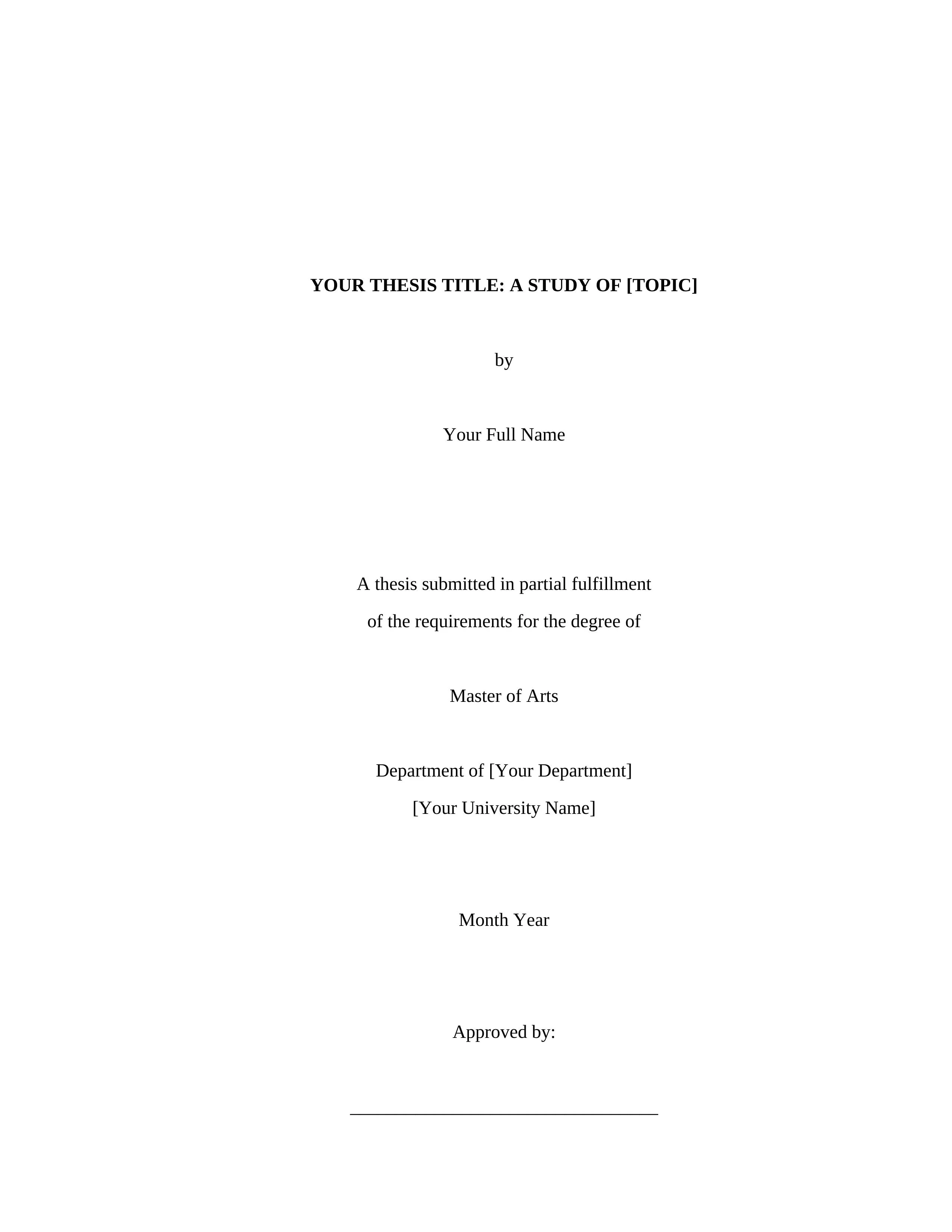
Title page. Your thesis title (often in all caps), your name, degree information, department, university, date, and committee approval signatures. This is the cover page for thesis submissions. Your institution will likely have a specific template for this page.
Copyright page (optional). A single centered line with the copyright symbol, year, and your name. No page number.
Abstract. A summary of your entire thesis in 150 to 350 words (check your institution’s limit). Includes the thesis title, your name, university, and advisor. Some programs also require keywords.
Dedication (optional). A brief tribute, usually one to three lines, centered on the page.
Acknowledgments (optional but common). Thank your advisor, committee, participants, funding sources, and anyone who supported your work.
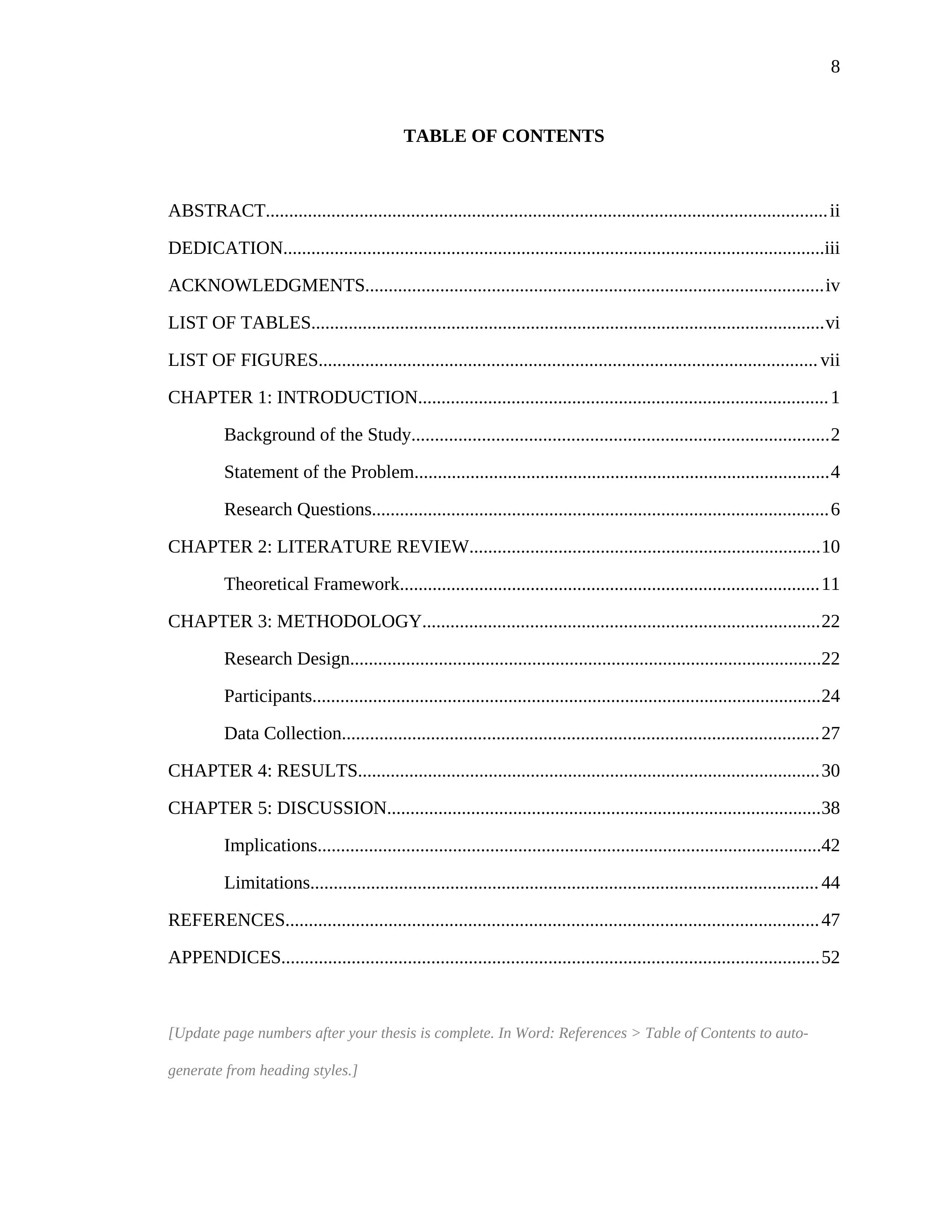
Table of contents. Lists every chapter, section heading, and front/back matter element with page numbers. This is where the formatting matters most: use dotted leaders between the heading text and page number, and indent subsections. In Word, you can auto-generate this from heading styles.
List of tables and List of figures (if applicable). Formatted like the table of contents, listing each table or figure by number, title, and page.
Body#
The body contains your actual research. Page numbering switches to Arabic numerals (1, 2, 3) starting with Chapter 1. The standard five-chapter thesis structure looks like this:
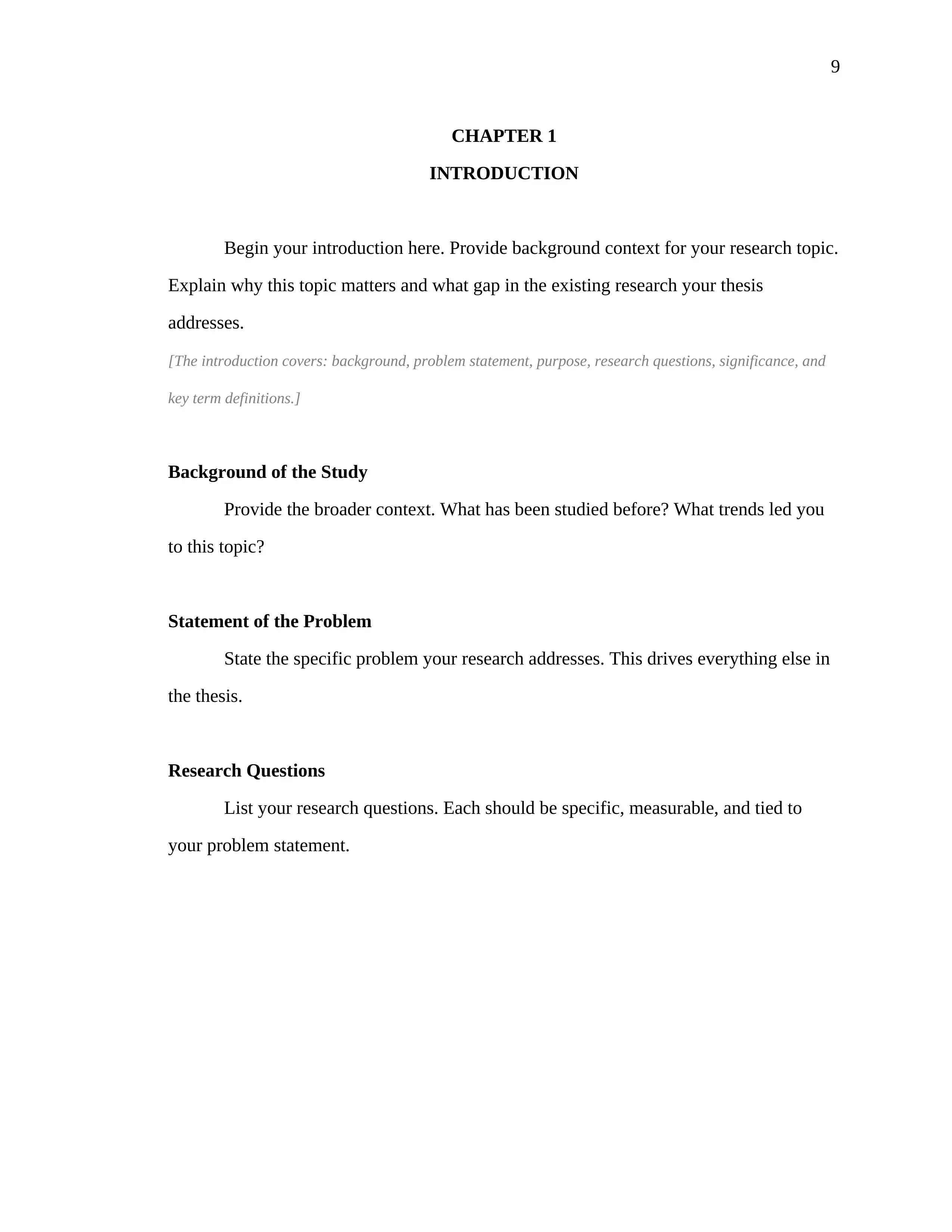
Chapter 1: Introduction. Background, problem statement, purpose, research questions, significance, and definitions of key terms.
Chapter 2: Literature Review. Summary and analysis of existing research on your topic. Organized by theme, methodology, or chronology.
Chapter 3: Methodology. Your research design, participants, instruments, data collection procedures, and data analysis methods.
Chapter 4: Results. What you found, presented without interpretation. Tables and figures go here.
Chapter 5: Discussion. What your results mean, connected back to your literature review. Includes implications, limitations, and recommendations for future research.
This is an example of thesis structure for an empirical research thesis. Other formats exist: a three-chapter thesis (introduction, body, conclusion) for humanities, a manuscript-format thesis that bundles published journal articles, or a creative thesis with an original work plus a critical essay. Your committee determines which format applies. Our thesis structure guide breaks down each of these models in detail.
Back Matter#
References or Bibliography. Every source cited in your thesis, formatted in the citation style your department requires. Uses hanging indentation.
Appendices. Supplementary materials: survey instruments, interview protocols, raw data tables, IRB approval letters, permissions. Each appendix starts on a new page and is labeled A, B, C.
Thesis Formatting Requirements: The Universal Rules#
While every school publishes its own guide, these requirements appear in virtually all of them.
Page size: 8.5 x 11 inches (US Letter). International students at US schools sometimes accidentally use A4; this will be rejected.
Margins: 1 inch on top, bottom, and right. The left margin is usually 1.25 to 1.5 inches to allow for binding. Check your institution’s requirement.
Font: Times New Roman 12pt is the most commonly required. Some schools accept Arial 11pt, Calibri 11pt, or other readable fonts. Use one font consistently throughout the entire document.
Line spacing: Double-spaced for the body text. Block quotations and some front matter elements (like the table of contents) may be single-spaced. Footnotes are typically single-spaced with a blank line between entries.
Paragraph indentation: First line of each paragraph indented 0.5 inches. Exceptions: the abstract (no indent) and block quotations (entire block indented 0.5 inches from left).
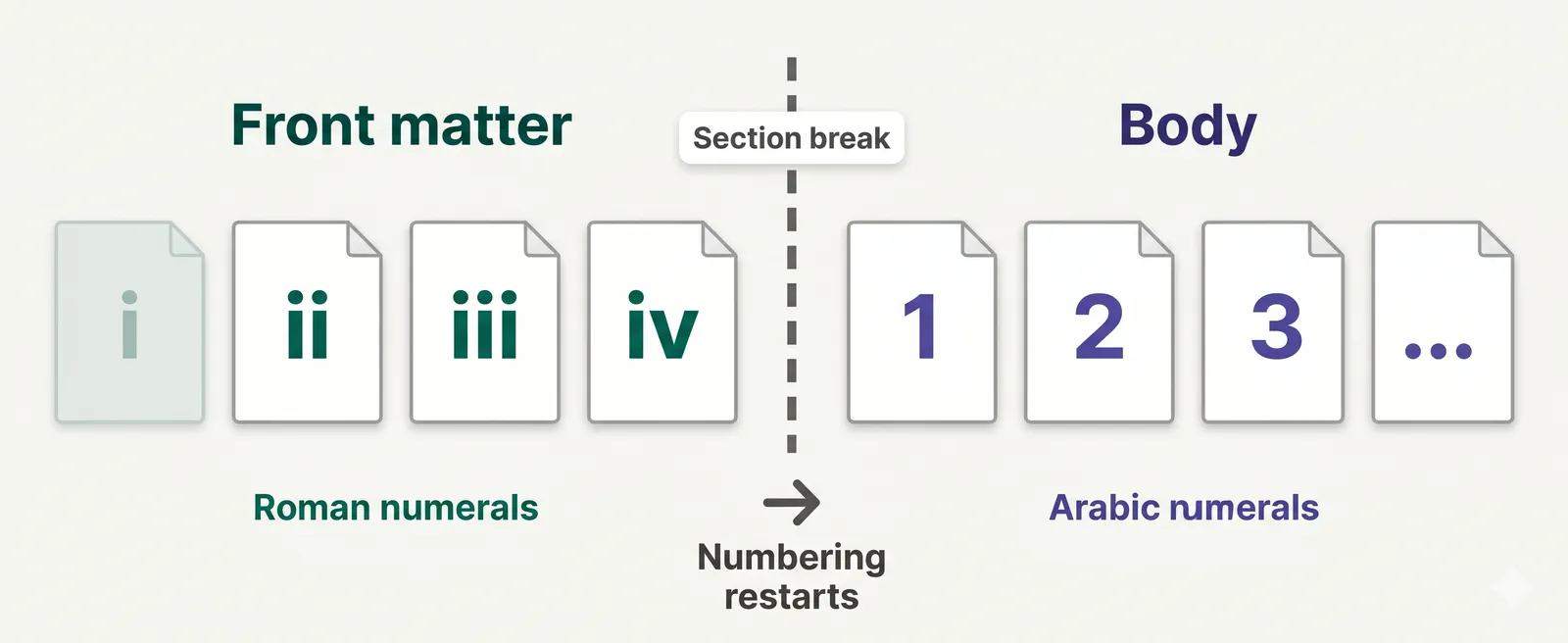
Page numbers: Roman numerals for front matter (starting at ii; the title page is i but the number is hidden). Arabic numerals for the body, starting at 1 on the first page of Chapter 1. Page numbers go in the upper right corner or bottom center, consistent throughout.
Headings: Chapter titles are typically centered and bold, often in all caps. Subsection headings follow a hierarchy (centered bold, flush left bold, flush left bold italic) that mirrors APA heading levels in many programs. The heading levels should be consistent across all chapters.
Thesis Paper Format by Citation Style#
Your department will specify which citation style to use. Here’s how thesis paper format varies by style.
APA Style Thesis Format#
The APA style thesis format uses the heading levels from APA 7th edition: Level 1 centered and bold, Level 2 flush left and bold, Level 3 flush left bold italic. References use hanging indentation with author-date citations. The same rules apply to the APA dissertation at the doctoral level. Many education, psychology, nursing, and social science programs require APA. (Our APA format guide covers the heading levels in detail.)
MLA Thesis Format#
MLA format uses a simpler heading structure. It typically uses your last name and page number in the upper right header. Works Cited replaces References. Citation style is author-page: (Smith 45). Common in English, comparative literature, and humanities programs.
Chicago/Turabian#
Chicago style is common in history and some social sciences. Turabian is the student-specific version. Uses footnotes or endnotes for citations rather than parenthetical references. The chapter structure follows the same pattern regardless of citation style.
Thesis Formatting in Word: Step by Step#
Most theses are written in Microsoft Word. Here’s how to set up your thesis document correctly.
Margins. Layout > Margins > Custom Margins. Set top, bottom, and right to 1 inch. Set left to 1.5 inches (for binding).
Font and spacing. Home tab: Times New Roman, 12pt. Paragraph settings: Line spacing 2.0, spacing before and after 0pt. Special: First line indent 0.5 inches.
Page numbering with two systems. This is the part that trips people up. You need Roman numerals for front matter and Arabic for the body, and they have to restart. In Word: insert section breaks (Layout > Breaks > Next Page) between front matter and body. Then in each section, go to Insert > Page Number, click “Format Page Numbers,” and set the number format and starting value separately for each section. Unlink the sections so changing one doesn’t change the other.
Heading styles. Use Word’s built-in heading styles (Heading 1 for chapter titles, Heading 2 for major sections, Heading 3 for subsections). This makes the automatic table of contents work and ensures your structure is navigable.
Table of contents. Once your headings are styled, go to References > Table of Contents > Automatic Table. Word generates it from your heading styles. Right-click the TOC and select “Update Field” before final submission.
If setting up all of this manually feels tedious, download our free thesis template for Word, which has every setting pre-configured.
Thesis Format Example: What It Looks Like#
Here’s a sample format of thesis front matter for a master’s in education:
Title page: “THE IMPACT OF PROJECT-BASED LEARNING ON STUDENT ENGAGEMENT IN RURAL MIDDLE SCHOOLS” centered in bold. Below: “by,” then “Sarah Chen.” Below that: “A thesis submitted in partial fulfillment of the requirements for the degree of Master of Education.” Department, university, month and year. Committee signatures at the bottom.
Abstract (page ii): Title repeated, author name, university, year, advisor. 280-word summary covering purpose, methodology (mixed methods, 6 schools, 342 students), key findings (14% increase in engagement scores, 23% improvement in attendance), and conclusions.
Table of contents (page v): ABSTRACT with dotted leader to ii. CHAPTERS listed with subsections indented. REFERENCES and APPENDICES at the bottom.
Chapter 1 (page 1): “CHAPTER 1” centered, then “INTRODUCTION” on the next line. First paragraph begins with a first-line indent, no heading label for the introduction itself.
This represents the standard five-chapter empirical format. A humanities thesis might have different chapter titles, but the front matter structure remains the same.
Common Thesis Formatting Mistakes#
Wrong page numbering. The number one rejection reason. Roman numerals in front matter and Arabic in the body must restart independently. If your front matter shows 1, 2, 3 instead of i, ii, iii, or your body starts at page 8 instead of page 1, it will be sent back.
Inconsistent heading styles. If Chapter 1 uses centered bold headings and Chapter 4 uses left-aligned headings, your committee will notice. Set up heading styles in Word once and apply them consistently.
Margins that don’t account for binding. A 1-inch left margin looks correct on screen, but after binding, text near the left edge becomes unreadable. Most schools require 1.25 to 1.5 inches on the left specifically for this reason.
Table of contents doesn’t match actual pages. If you add or remove content after generating your TOC, the page numbers will be wrong. Always update the table of contents as the very last step before submission.
Appendix formatting breaks. Appendices must follow the same margin and page numbering rules as the body. Oversized tables or figures that invade the margins are a common reason for rejection.
Free Thesis Template Download#
Our thesis template for Word includes the complete thesis structure: title page with committee signature lines, copyright page, abstract, dedication, acknowledgments, table of contents with dotted leaders, five body chapters with heading levels, references with hanging indentation, and an appendix page.
The template is configured with a 1.5-inch left margin (binding), 1-inch margins on all other sides, Times New Roman 12pt, double spacing, proper heading styles (Heading 1 through Heading 3), and section breaks with correctly configured page numbering (Roman for front matter, Arabic for body).
Gray italic instruction text throughout the template explains what goes on each page and what to delete before submission. Download the .docx, replace the placeholder text with your own content, and you have a properly formatted thesis. No signup required.
Download the free Formatli Thesis Template (.docx)
The template works in Word, Google Docs, and LibreOffice. For LaTeX users: the same thesis structure applies, but you’ll use your university’s LaTeX template or a package like classicthesis instead of Word. The organizational principles described in this guide are the same.
Frequently Asked Questions#
What is thesis formatting?
Thesis formatting is the process of configuring your thesis document to meet your graduate school’s requirements for margins, fonts, spacing, headings, page numbering, and section order. It covers the entire thesis layout from the title page through the appendices. Your institution’s graduate school publishes a formatting guide with specific requirements.
What is the standard thesis structure?
The standard thesis structure has three parts: front matter (title page, abstract, acknowledgments, table of contents), body (typically five chapters: Introduction, Literature Review, Methodology, Results, Discussion), and back matter (references and appendices). Humanities theses may use different chapter names.
What margins does a thesis need?
Most institutions require 1 inch on the top, bottom, and right, with 1.25 to 1.5 inches on the left to allow for binding. Check your specific program’s requirements, as left margin width is one of the few areas where schools differ significantly.
How does page numbering work in a thesis?
Front matter pages use lowercase Roman numerals (ii, iii, iv), starting at ii (the title page is counted as i but the number is hidden). Body pages use Arabic numerals (1, 2, 3), starting at 1 on the first page of Chapter 1. Each system is independent. In Word, you create section breaks between front matter and body, then format page numbers separately in each section.
What font should I use for a thesis?
Times New Roman 12pt is the most widely accepted font for thesis documents. Many schools also accept Arial 11pt, Calibri 11pt, or Georgia 11pt. Use one font consistently throughout. Check your institution’s formatting guide, as some programs restrict font choices more than others.
Do I need an abstract for my thesis?
Yes. Nearly all graduate schools require an abstract of 150 to 350 words summarizing your research purpose, methods, findings, and conclusions. The abstract appears in the front matter, typically on page ii, and is often the first section readers encounter after the title page.
What’s the difference between a thesis and a dissertation?
In the US, “thesis” typically refers to a master’s-level research document, while “dissertation” refers to a doctoral-level document. The formatting requirements are nearly identical. The APA dissertation format follows the same structural rules as a thesis. Some international universities use the terms differently.
Can I use LaTeX instead of Word for my thesis?
Yes. Many STEM programs provide a LaTeX template for thesis formatting, or you can use packages like classicthesis or memoir. The thesis structure in LaTeX follows the same requirements (front matter, body, back matter), but the implementation differs. Check whether your institution provides a LaTeX template before building your own.
Is there a free thesis template I can download?
Yes. Our free thesis template for Word includes every section from title page through appendices, configured with correct margins, fonts, spacing, heading styles, and page numbering. It follows the standard thesis outline format used by most US universities. No signup required. You can also check your university’s graduate school website, as many provide institution-specific templates.